|
dSLR Fractal Sharpen Actions Set |
| No Longer For Sale |
| System Requirements | Description | Action Examples | Policies |
dSLR Fractal Sharpen
is an older product that's no longer for sale.
Please see our Upscale Sharpen product as an alternative.
We've designed a great set of sharpening actions that do something different: They actually sharpen images! There are so very many sharpening tools out there that simply add edge artifacts and/or change contrasts, and while they can provide images that may look better in print or on screen, they also often look overprocessed and garish.
| New in version v1_5 - On1 Software's On1 Resize plug-in Compatibility. |
My sharpening actions use the fractal capabilities of On1 Software's On1 Resize plug-in in a unique way to actually "see through" the fuzziness and create an image that's truly sharper and more refined than the original. Look at my examples below (or eMail me an image of your own, which we will be happy to sharpen for you) and see if you don't agree that the look is fresh and clean!
![[This is a 100% crop of a Canon EOS-10D image.]](images/FaceSharpening.jpg)
What do the actions in dSLR Fractal Sharpen actually do?
The dSLR Fractal Sharpen Actions Set gives you three levels of sharpening with four levels of noise immunity. Each action can be invoked with a single keystroke or mouse click.
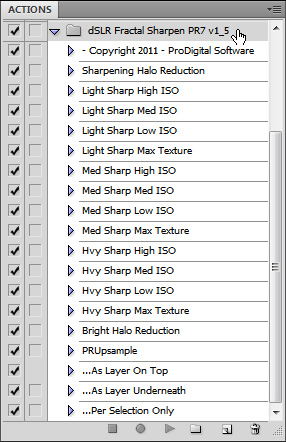
- Sharpening Halo Reduction - Removal of USM Sharpening Halo Artifacts.
- Light Sharp High ISO - Very light detail enhancement bringing out the least noise.
- Light Sharp Med ISO - Very light detail enhancement bringing out a bit more texture.
- Light Sharp Low ISO - Very light detail enhancement bringing out even more texture.
- Light Sharp Max Texture - Very light detail enhancement bringing out maximum texture.
- Med Sharp High ISO - Detail and edge enhancement for noisy images.
- Med Sharp Med ISO - Detail and edge enhancement bringing out a bit more texture.
- Med Sharp Low ISO - Detail and edge enhancement bringing out even more texture.
- Med Sharp Max Texture - Detail and edge enhancement bringing out maximum texture.
- Hvy Sharp High ISO - Lots of detail / heavy edge enhancement for noisy images.
- Hvy Sharp Med ISO - Lots of detail / heavy edge enhancement bringing out more texture.
- Hvy Sharp Low ISO - Lots of detail / heavy edge enhancement bringing out more texture.
- Hvy Sharp Max Texture - Lots of detail / heavy edge enhancement with maximum texture.
- Bright Halo Reduction - Removal of Bright Sharpening Halo Artifacts around Dark Objects.
The following actions to be applied after a main action above:
- ...As Layer On Top - Makes two layers with the action results above the original image.
- ...As Layer Underneath - Makes two layers with the action results below the original image.
- ...Per Selection Only - Restricts results to the area selected before the main action was run.
These are professional quality actions - macro operations that are loaded into Adobe® Photoshop® - producing top quality results you can print, publish on the web, or use in further operations. They work great with Adobe® Photoshop® CS3 to CS6, CC, or 2020 and newer with the On1 Resize plug-in on PCs and Macintoshes alike, and come with a money-back guarantee.
![[Hvy Sharp Max Texture Brings out Detail in this 100% crop of a Canon EOS-10D Image You Didn't Know was There!]](images/FractalSharpenRiver.jpg)
It's like you finally put your glasses on!
![[Hvy Sharp Low ISO really sharpens this 100% crop of a Canon EOS-10D image. Look at the detail!]](images/FractalSharpenDuck.jpg)
I may be refining the actions or adding handy new features to dSLR Fractal Sharpen from time to time. Your purchase entitles you to free updates.
The actions in dSLR Fractal Sharpen work on 8 bit-per-channel or 16 bit-per-channel RGB mode images.
Raw shooters take note: You can actually achieve sharper output using these actions on in-camera JPEGs than you have been getting from your Raw converters - I'm not kidding! Now you can take advantage of the ease and speed of shooting JPEGs - or you can use these actions on your Raw conversions and pop out details you never knew were there!
An industry first! Possibly the most amazing thing about the dSLR Fractal Sharpen actions is that they can be used to actually REDUCE artifacts! That's right, the unique qualities of fractal algorithms are such that they are insensitive to artificial "digital" artifacts in your images, and "see through" to the actual subject material!
![[These actions actually REMOVE artifacts!]](images/ArtifactReduction.jpg)
Are these actions better than just doing it yourself with Unsharp Mask in Adobe® Photoshop®?
- Images are truly sharpened, not just littered with garish edge-enhancing halos.
- These actions actually eliminate artifacts, such as stairstepping from JPEG 2 by 1 color subsampling.
- Hvy Sharp actions do very fine edge enhancement to precompensate for loss of sharpness in some printer drivers.
- Results can be combined with other sharpening and contrast-enhancement methods.
- These actions work well with those in my dSLR Tools Actions Set.
- Simple operation - one mouse click runs each action. Tie favorites to function keys for one button operation.
- The steps are optimized so as to provide top-notch, second-to-none, professional image quality.
- All actions work on a single layer, so you can erase through a higher layer or use a mask to expose the results.
- I've done hundreds of hours of work so you don't have to!
![[dSLR Fractal Sharpening actually achieves the ultimate - TRUE sharpening!]](images/TrueSharpening.jpg)
Because these actions work on upsampled images, they can use a large amount of computer resources and take a few minutes to complete, depending on the size of your original image. Be patient. Good things come to those who wait!